显示标签为“GTA”的博文。显示所有博文

2009年1月27日星期二

GTA4,你需要知道的某些东西!

GTA系列游戏中,车辆一直都是最受喜爱的载具.尽管开着飞机畅游长空,鸟瞰都市,尽管开着摩托享受速度与激情,这些都是快乐的体验.但比起驾驶一辆豪华的Limo来说,都够不上范儿!来认识一下GTA4中的所有车辆吧,哪些强劲,哪些帅气,哪些难看得要命:


带我去看车车!!!


车辆不光用来酷炫,还是逃避警车追逐的好工具,但有时候逃不掉了,那就硬着头皮操家伙咯.于是乎,枪支,成了GTA系列第二大令玩家痴迷的装备.看看这个页面,也许能找到你趁手的:

带我去看枪枪!!!


多个朋友多碗饭,朋友多了活到老,古老的谚语无一不述说着朋友之间珍贵的情谊.拍马屁要拍到点儿,GTA4中Niko的朋友们,都有哪些特点,尤其是那些美人儿,眼光有多么挑剔?要想投其所好,增加好感,最好看看这个:

带我去看朋友!!!


在庞大的LC城迷失了自己的方向么?两种解决办法:一,买一本纽约地图;二,用Google Map.不过这里的GoogleMap就不再Google纽约了,而是实实在在的LibertyCity.不信,你去看看:

带我去看地图


摘自gta4.net

The Majestic 逃脱之王?

Brandon Smith has recently released the most epic(yes i'll say it, epic) machinima, using GTAIV, to date. The video includes awesome shoot-outs, chases and camera angles, all rendered and uploaded to view in HD. This video truely shows how good GTAIV actually is, but it also shows what bugs the video editor and the game still have, which is sad to see almost 2 months after the PC release. Brandon Smith had the following to say: "I am a 3rd year college student and I'd love to do this kinda stuff for a living but since theres no money in it... I'm almost forced to do something else... This will be my last project for a while, until I can get my feet on the ground in a new semester of college." Without further ado, watch the HD version of The Majestic right here and don't forget to comment!

这是一部被该网站编辑强烈推荐的巨作.视频包括了很多刺激的射击追逐镜头.视频完全展示了GTA4的高自由度和电影感觉,但游戏发布后的一些Bug和问题依然存在.作者Brandon Smith是个大学三年级学生,他可能不短时间离开GTA4电影制作,因为手头比较紧...不管怎样,看看视频先!


事实上,这的确是我看过的最长的一部视频了,基本上可称为完整的短片.整个视频的结构还算比较紧凑的,不过对白实在太少,另外选择的音乐并没有认真的进行剪切,这些都比较遗憾.逃脱大师的整个逃脱行为很流畅,重点的出场和特写都具备.可以算长片,但不能算是巨作.我们国内的好多朋友都可以做得比这个更精彩!

2009年1月24日星期六

GTA4 Patch 1.02 Released Today?


News from gtaforums.com

Version 1.0.2.0
GRAPHICS FIXES / ADDITIONS:

* Graphics Menu:
o Added "Water Quality", "Shadow Quality" and "Reflection Resolution" sliders in graphics menu.
o Added "Definition" and "VSync" toggles in graphics menu.
* Rendering optimizations.
* VSync optimizations.
* Nvidia 7000 series
o Mirrors fixed

PATCH 1 FIXES:

* Direct input device support is now disabled by default and can only be enabled with the commandline: "-usedirectinput"
* Supported Controllers:
o Logitech Dual Action
o Logitech RumblePad 2
o Logitech Cordless RumblePad 2
o Saitek P2500
* Supported Wheels:
* Note: Controls are unmapped, user must map controls using Manufacturer's mapping software.
o Logitech G25 Racing Wheel
o Logitech Wingman Formula GP Wheel
o Logitech MOMO Racing
o MOMO Force
o Driving Force Pro
o Driving Force
o Formula Force
* Added Commandline "-notimefix" which will help some users who are experiencing the fast/slow gameplay issue after patch 1 was applied.
* Fixed a bug that caused some users to experience endless looping audio effects after Patch 1 was applied.
* Benchmark was disabling sounds after Patch 1 was applied, this is now fixed.

CRASH FIXES:

* Unable to load game fixed - For some users, a DOS window would open and close immediately upon Game Launch, GTA IV would never launch.
* Hang on Initial Game Loading Screen fixed - Some users experienced Character Art Loading screens in an endless loop.
* Certain causes of the RESC10 error have been fixed (Alt-Tab, change resolution). If you experience an RESC10 error, you must restart.
* Certain Instances of the "GRAND THEFT AUTO IV has encountered a problem and needs to close" error have been fixed.

VIDEO EDITOR:

* Naming clips is now mandatory on Export .

MULTIPLAYER:

* Legitimate players being kicked from Multiplayer matches has been fixed.

GENERAL ADDITIONS / FIXES:

* Wireless 360 controllers not functioning - Triggers were full on/off, fixed.
* In the Options menu accessed from the Title Screen a �Game� section has been added with the ability to turn Clip capture on/off.

下载链接

Key Code Constants

在GTA4中使用ASI插件,极有可能需要用到以下内容,即键盘按键的实际程序代码,即便自己不会也不用亲自做asi程序,也会在使用不同mods中因为按键冲突而需要自己亲自修改,那么,仔细看吧:

Key Code Constants
按键 代码值 描述

Key Codes(综合功能键)
vbKeyLButton 1 Left mouse button
vbKeyRButton 2 Right mouse button
vbKeyCancel 3 CANCEL key
vbKeyMButton 4 Middle mouse button
vbKeyBack 8 BACKSPACE key
vbKeyTab 9 TAB key
vbKeyClear 12 CLEAR key
vbKeyReturn 13 ENTER key
vbKeyShift 16 SHIFT key
vbKeyControl 17 CTRL key
vbKeyMenu 18 MENU key
vbKeyPause 19 PAUSE key
vbKeyCapital 20 CAPS LOCK key
vbKeyEscape 27 ESC key
vbKeySpace 32 SPACEBAR key
vbKeyPageUp 33 PAGE UP key
vbKeyPageDown 34 PAGE DOWN key
vbKeyEnd 35 END key
vbKeyHome 36 HOME key
vbKeyLeft 37 LEFT ARROW key
vbKeyUp 38 UP ARROW key
vbKeyRight 39 RIGHT ARROW key
vbKeyDown 40 DOWN ARROW key
vbKeySelect 41 SELECT key
vbKeyPrint 42 PRINT SCREEN key
vbKeyExecute 43 EXECUTE key
vbKeySnapshot 44 SNAPSHOT key
vbKeyInsert 45 INS key
vbKeyDelete 46 DEL key
vbKeyHelp 47 HELP key
vbKeyNumlock 144 NUM LOCK key


KeyA Through KeyZ(字母区按键)
vbKeyA 65 A key
vbKeyB 66 B key
vbKeyC 67 C key
vbKeyD 68 D key
vbKeyE 69 E key
vbKeyF 70 F key
vbKeyG 71 G key
vbKeyH 72 H key
vbKeyI 73 I key
vbKeyJ 74 J key
vbKeyK 75 K key
vbKeyL 76 L key
vbKeyM 77 M key
vbKeyN 78 N key
vbKeyO 79 O key
vbKeyP 80 P key
vbKeyQ 81 Q key
vbKeyR 82 R key
vbKeyS 83 S key
vbKeyT 84 T key
vbKeyU 85 U key
vbKeyV 86 V key
vbKeyW 87 W key
vbKeyX 88 X key
vbKeyY 89 Y key
vbKeyZ 90 Z key


Key0 Through Key9(键盘区数字键)
vbKey0 48 0 key
vbKey1 49 1 key
vbKey2 50 2 key
vbKey3 51 3 key
vbKey4 52 4 key
vbKey5 53 5 key
vbKey6 54 6 key
vbKey7 55 7 key
vbKey8 56 8 key
vbKey9 57 9 key


Keys on the Numeric Keypad(小键盘区数字键)
vbKeyNumpad0 96 0 key
vbKeyNumpad1 97 1 key
vbKeyNumpad2 98 2 key
vbKeyNumpad3 99 3 key
vbKeyNumpad4 100 4 key
vbKeyNumpad5 101 5 key
vbKeyNumpad6 102 6 key
vbKeyNumpad7 103 7 key
vbKeyNumpad8 104 8 key
vbKeyNumpad9 105 9 key
vbKeyMultiply 106 MULTIPLICATION SIGN (*) key
vbKeyAdd 107 PLUS SIGN (+) key
vbKeySeparator 108 ENTER (keypad) key
vbKeySubtract 109 MINUS SIGN (-) key
vbKeyDecimal 110 DECIMAL POINT(.) key
vbKeyDivide 111 DIVISION SIGN (/) key


Function Keys(功能键F1~F12)
vbKeyF1 112 F1 key
vbKeyF2 113 F2 key
vbKeyF3 114 F3 key
vbKeyF4 115 F4 key
vbKeyF5 116 F5 key
vbKeyF6 117 F6 key
vbKeyF7 118 F7 key
vbKeyF8 119 F8 key
vbKeyF9 120 F9 key
vbKeyF10 121 F10 key
vbKeyF11 122 F11 key
vbKeyF12 123 F12 key
vbKeyF13 124 F13 key
vbKeyF14 125 F14 key
vbKeyF15 126 F15 key
vbKeyF16 127 F16 key

This is how looks and works perfection!

转自GTAForums.com,未经测试,仅供参考!

This is how looks and works perfection!
by RON123

As you can know, I am "RON123" for you, have always wanted to play perfectly GTA IV -the most difficult PC game to run on your computer.
Few days ago I found the last twick that will boost PFS for me, the one that will give me the best GTA IV experience that I have ever had.

Not only that I probably can play better then you and 99% of gamers, I am also getting one of the best quality frames in the world.

First of all the results: I able to play a very smooth gameplay in the next settings:
1920x1200 res, max settings gameplay.


GTA requirements:

First I must explain what high edge hardware GTA IV requires.
This is the only game in the market that
requires any 3-4 cores normal CPU and in addition high amount of VRAM.
As a result, one of the above is a common "bottleneck", It means that upgrading your rig without solving the bottleneck won't really improve performane.
I for example, OC my q6600 to 3.00 GHZ (while using the stock cooler) and did'nt get big improvement, and in addition OC my GPU:
core speed 600 to 642
Shader clock 1500 to 1605
memory clock 900 to 1070
Note: numbers in MHZ, OC while using the stock cooler

This upgrades won't change much for me, because my bottleneck in max settings is the 512 VRAM MB.
The normal framerate (not my) depends mostly on the CPU speed.
However, the quality of the frames depends mostly on amount of VRAM, as textures quality and resolution go up then VRAM requirement will increase either. .
Bad CPU will cause low framerate and shortage of VRAM will cause all the known bugs and poor image quality (all bugs can be solved).


There are many performace mods that cost game quality for increasing the framerate, I choose not to use them, because I want to play perfectly as Rockstar originally intended.
Now I will post all the useful twicks that won't harm the quality of the frames:

First, the common twicks:
1. Use windows XP/7 ,-Vista is killing the framerate (some 25%-50% in average).
2. Close all running programs, including GTAbrowser.exe and RGSC.exe (social club, if you use it).
3. Download the last driver and patch.
4. Give to GTAIV.exe high priority in task manager
5. Switch off the capture movie option (in game's menu).
6. Clean all the unnecessary services, can be done in two ways:
A. use msconfig: press "start", then "run", type their "msconfig", in "genetal" press "selective startup" uncheck first second and fourth marks, then look in this window for "services", press it, than mark "hide all microsoft services", after it press "Disable all", then press apply and restart windows in a clean mod, you will see that most of your games will run better, in the new mod don't enter the Internet and other programs (only games), from "msconfig" you can choose "Normal startup" for going beck to all of your programs (will restart windows).
B. Download AlacrityPC program (link ), which allow you do save a clean profile and load it before lunching the game without restarting Windows (my favorite).

Second,the less common twicks:
7. use Xliveless mod (link) just to get rit of social club and windows live, it won't change performance.
8. I using the RMClock to lock the throttle of the CPU while in game, it seems that gta iv doesn't know to do it itself like any other game.(link)
9. To improve the overall frames quality it better to force AA (I did it from Nvidia's control penal). Do it only if you got some 30 frame in gameplay, because it uses resources and will harm the framerate(the improvement is really nice but not like an original AA)
10. Now I will explain how to use the commandline, the most importent twicks for best performances:
"-norestrictions": will allow the game to use max settings but wont boost performance.
"-novblank": Won't limit your framerate and will allow it to go as high as it can, very useful.
"-availablevidmem x.xx": this command will solve magically all the bugs (missing textures/ slow loading textures/ flickering shadows and more) and can improve any quality of frames. Use it only if you has really bad quality (otherwise ignore it). This twick uses your RAM in addition to your VRAM, as a result it costs in a lower framerate, as more RAM you use then the drop in framerame will be bigger. You don't need to use a lot of VRAM just 200MB-300MB of extra RAM will solve all the missing textures and 50MB-80MB of ram will solve all the little bugs like flickering objects. x.xx is a multiplier of your RAM. For example 2.00 will make 500MB VRAM to "500MB VRAM" + "500MB RAM" = "1000MB totul memory" usage.
"-percentvidmem xxx": I thought that this command is useless, but I found out few days a ago, that this commande is just want I needed for perfect framerate, you must use it while using "-availablevidmem x.xx" in order to get 100% of your VRAM usage, which will boost extremly the framerate for users of ""-availablevidmem x.xx". Set xxx to 100.
11. This is a optional twick, it will change the way your rig uses memory, it should improve the min framerate but will cost in a lower max framerate,I advice to just try it for a 15-20 fps gameplay. Change this: "Open regedit (from "run") and go to hkey local machine/system/current control set/control/session manager/memory management and change disablepagingexecutive and largesystemcache to 1". -you can test it and change it back to 0 like it was before.

My experience:
The q6600 2.4 GHZ will give 35-50 frames in any settings, 512MB of VRAM is too low for even 1680x1050 high textures gameplay, the result is many bugs including the missing textures,a 1920x1200 max settings gameplay requires 750MB of memory in order to be free of even small bugs, I set "-availablevidmem 1.5" for usage of 749MB, my framerate drops to 28-32 while driving in an OC Q6600 to 3.00, This OC gave me just extra 3-4 FPS. this is my full commandline: "-norestrictions -novblank -percentvidmem 100 -availablevidmem 1.5".
It's very hard to test the unstable framerate of this game, I advice to test with fraps (benchmark won't give real results) while normaly driving the town in daylight.

proof:
here is a gameplay (20-25 fps) in max settings + AA, I used the stock speeds of my CPU and GPU (no overclockig), Fraps takes some 4-5 frames from game, so add them (in your mind).(I used all the twicks above without number 11) -max settings +forced AA Gameplay in youtube

I hope I really helped to most of you, and if you already knew it all, so this guide is for an average gamer.
Note: I ready to prove all I sayed above, and I will post extra staff in this thread later.

edit :
I said in the post, that this is not a real/original AA, GTA won't support it. forcing AA from nvidia, even a high AA of 8xQ is not the real thing, it is just looks a little better, the camera moves smoother, it is not a big change, just the overall is better, I will try to capture it and post, I dont have an HD camera.
I looked pixel by pixel and this is not a real AA, I shound't even use this word.
it looks like it is filtering better when this option is on, the colours looks sharper.
I just should say better image quality and that is it.

希望以上方法对GTA4Gamer有效.

2009年1月23日星期五

Grand Theft Auto IV TweakGuide

Grand Theft Auto IV TweakGuide
written by Ettans @ iv-scripting.pri.ee
Update: New information in Part 2 concerning FarClp @ 3500.00

Part 1: Patching the files

First thing you should do, is download the GTA IV Magic Patcher by aru, in order to edit the files. Now, once you've downloaded and extracted it, open it and you'll see this:


If you haven't already patched your files, click on Validate Files, once done, click on Apply Patch. Now you can edit your GTA IV files and you'll also have backups of every file, with .magic as their file extension. You can revert the files anytime, by clicking on Verify and then Recover. You can now close the program.


Part 2: Changing the view-distance

That was quite easy, wasn't it? Browse to your Grand Theft Auto IV\pc\data folder and open the file named timecyc.dat. I suggest you use Notepad++ for the editing, since it'll look very messy in the default Notepad. Once you have the file open, look for the fiel called "FarClp", this controls the distance from which buildings, trees etc. are drawn at. The smaller the value, the shorter the view-distance. The default value is 1500.00, which is very big and quite pointless. To change the view-distance, simply change the value to a smaller one, I use 500.00 personally. If you're either too lazy to change it or whatever your reason is, I've attached the edited file at the bottom of this thread.

Comparison screenshots:

FarClp: 3500.00

Note: This gave me about +5-8 FPS, I suggest you try it out. I'm not entirely sure, but I think this has got something to do with PreFetch.

FarClp: 1500.00 (Default value)


FarClp: 750.00


FarClp: 500.00


In-game settings used:

Note: All screenshots were taken at the same place, time and weather, on-top of the GetALife building.

Download timecyc.dat (FarClp 3500.00)
Download timecyc.dat (FarClp 750.00)
Download timecyc.dat (FarClp 500.00)
Note: Extract it using WinRar or any similar program and place the file in your Grand Theft Auto IV\pc\data folder.

Part 3: Disabling shadows

Disabling the shadows doesn't have any significant impact on the games performance, but it might be useful for you if you're really struggling with the FPS. In order to disable the shadows, you should first download Alice by Alexander Blade. Extract the file and place the Alice folder in your main Grand Theft Auto IV folder. To disable the shadows, you can either make the script yourself, or download the one I made, using Alexander Blade's example script(s). To re-enable the shadows, simply delete the disable_shadows.lua in your Grand Theft Auto IV\Alice folder.

Shadows: Enabled


Shadows: Disabled


Note: All screenshots were taken at the same place, time and weather.
Download disable_shadows.zip

Part 4: Lowering bloom intensity

Currently there's no way to completely disable the bloom in Grand Theft Auto IV, but you can lower it's intensity. To do this, browse to your Grand Theft Auto IV\common\data folder and open the file called visualSettings.dat. Open the file and find the following names:


misc.BloomIntensityClamp.HD
misc.BloomIntensityClamp.SD
misc.BloomIntensityClamp.SD.ps3


Simply change their values to 0.00. If you don't want to edit the values yourself, download the visualSettings.rar at the bottom of this part and extract it to your Grand Theft Auto IV\common\data folder.

Bloom intensity: Default


Bloom Intensity: 0.00/Disabled


Note: All screenshots were taken at the same place, time and weather.
Download visualsettings.zip

Part 5 (Optional): Lowering the amount of rain particles

A lot of people are having trouble playing Grand Theft Auto IV with it's rainy weather, this is caused by the amount of it's particles (mostly). I can't guarantee that this will give you any performance boost, but It did make my gameplay smoother. To change the amount of rain particles, browse to your Grand Theft Auto IV\common\data folder and open the file called visualsettings.dat. Find the following fields there:


rain.NumberParticles.ps3
rain.NumberParticles


Here are the values I use myself:


rain.NumberParticles.ps3 256
rain.NumberParticles 1024


So, that concludes my Grand Theft Auto IV TweakGuide. Thanks a lot for reading, hopefully this tweak will help some people. If you want to post this on your forums/website, please don't copy & paste, but put a link to this thread.

Credits:

aru (Making the GTA IV Magic Patcher)
Anders (Telling me about the rain particles & FarClp 3500.00)
Rockstar (For making such un-optimized game)

2009年1月22日星期四

The Lost and Damned Unlocked, No scripts, but bikes, & textures!

GTA4XBX专属附加游戏已经在PC上得到解密,不过只能解开各个隐藏的物品和衣服,并不能带来剧情的增加.可毕竟有8辆新增的摩托和不少飞车党的衣服,这已经令制作游戏视频的朋友大为宽慰了!

昨天重装系统,因为GTA4的视频编辑器不断在最后时刻出错死机,今天又刷了一边索泰9800GTX+显卡的BIOS,可编辑在机场一处的视频时依然出现SMPA60错误......郁闷的消息不断,试用了一个Mod后,游戏都进不去了,哪怕我用Patch恢复也没用......nnd,现在重装整个游戏!


by Indi. from GTAforums.com

Public BETA Release (Alternatively Version 1)


Features:

Makes Niko as Johnny (Biker Jacket replaces the Sand Jacket in the Russian Shop, Johnny's
Jeans are replaced with the Jeans from the Russian Shop, and also Johnny's Leather Jacket
will be replaced by the Biker Jacket that you got from Gerry McReary's mission)

Johnny's Leather Jacket (Replaces the Biker Jacket)

2 Sets of Fingerless Gloves are also included with this mod (2 sets are normal leather gloves and a very stylish Biker glove)

DLC Bikes (Names as follows: Angel, Deamon, Diablous, Hexer, Lycan, Nightblade, Revenant,
Wolfsbane)

100% Complete Save Game

DLC Weapon Icons (Pistol, Uzi, Grenade, AK47)

New Weapon Textures

New Loading Screen (They are crap but it'll do for now, because my photoshop isn't as good)


I'll clean the topic up when I'm finished, just gotta do the Weapon textres and it's done. Screens are coming soon

Credits:
pinky (data folder and Spawn locations Info)
aru (SparkIV)
blazer30uk (Finding/unlocking the DLC Bikes)
Simkas (Johnny Klebitz)

NOTE: That some of the DLC files were actually left over and were accidentally left in IV PC, I suppose that it would be possible to get them, so I put my head to it and got it, but... the leather jacket, 1 of the fingerless gloves and weapon textures were made by me. Yes, I did get permission from the people that are all up above!


这里有一段pc-gta.info网站的视频,有点儿意思:

2009年1月19日星期一

如何制作自己的GTA4服装之定制头盔

最近为了制作GhostRider的第二部,电脑都快抽筋了.也许是安装的软件太多,现在在输出720p画面的时候总是当机,不得不重启才行,难道最后我必须用Fraps来录?

这是题外话,今天我的任务是制作一款GhostRider专用的骑士头盔.

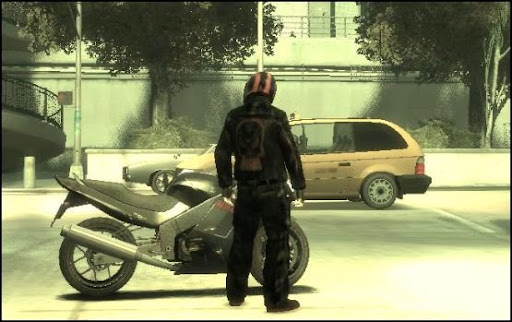
下面是原来的服装,一套GTA3代的夹克加一双很普通的球鞋,外加一个随机的头盔:


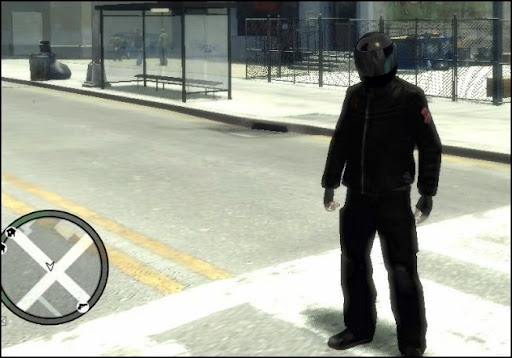
下面是修改过的衣服,纯黑的夹克和裤子,纯黑的运动皮鞋,深红色的头罩:


背面的图案是我一件Jack&Jones夹克上的.

注意我还给裤子加了护膝!

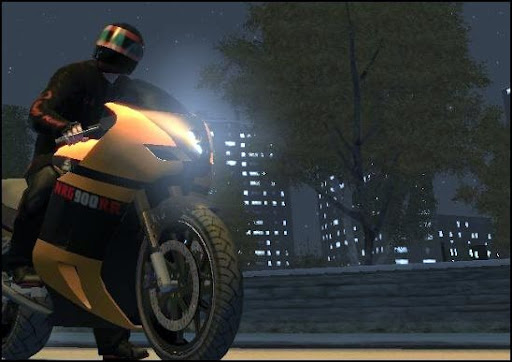
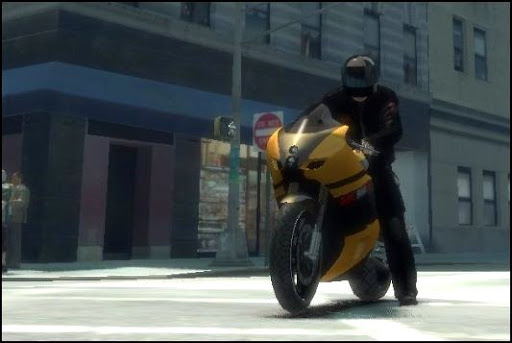
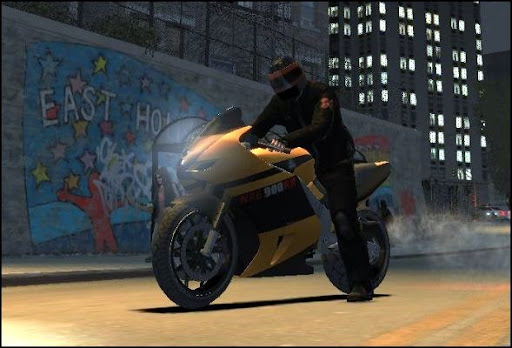
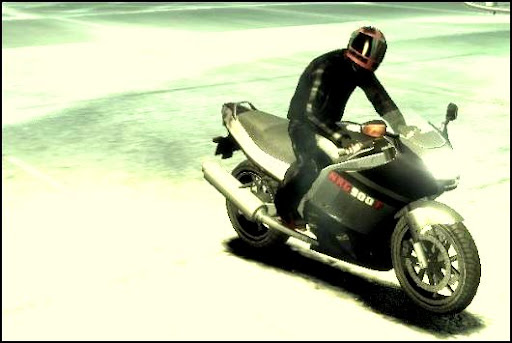
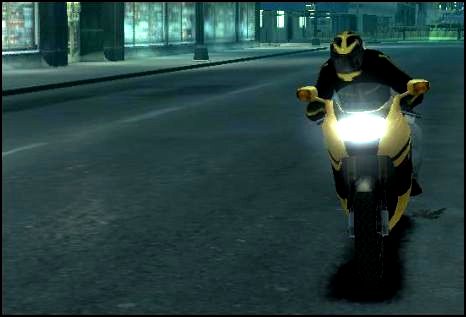
配上黑色的头盔加上GR御用的黄色NRG900就是这个效果:


当然,这主要是截图的效果,游戏玩家都知道,游戏中,带一定的模糊,画面和静态的有所区别.日光下效果如下图:


这样看来,GhostRider的外观,比原来强上了不少,至少不会像以前那样花枝招展了.黑色的低调,阴郁,压抑和红色的暴烈,激动,这些是原来的服装所无法体现的.

我不知道其他Mod玩家是怎么摆弄的,我的目的是给GhostRider换衣服,所以主要是修改Texture即素材,Model即模型方面的不太懂,不敢乱动,所以一切都要依着现有的模型基础来修改.这次我先来修改头盔!

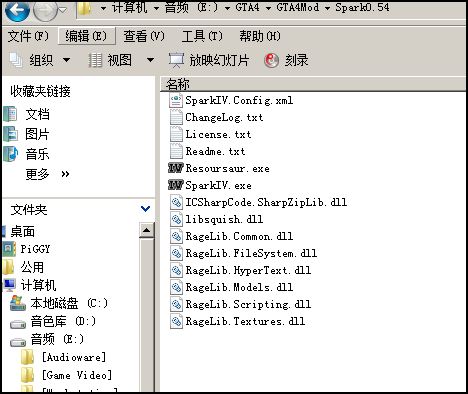
首先,我们需要下载一个由Aru大师制作的GTA4修改软件,Spark0.54,这个软件可以提取GTA4中间所有的的纹理素材,并加以更换.然后,注意备份好几个关键的文件,以便使用不当无法挽回.

(以下请高度注意!!!)
备份你GTA4安装路径下的\Rockstar Games\Grand Theft Auto IV\pc\models\cdimages文件夹,这里面包含了你可能会改动的包括人物贴图,物体贴图,建模,素材等等原始材料,总共大概750多MB.如果你只需要修改主角的服装和头盔的话,你也可以只备份cdimages文件夹下的pedprops.img和playerped.rpf两个文件.但这些都是建议,出了纰漏还是该你自己负责哈哈!

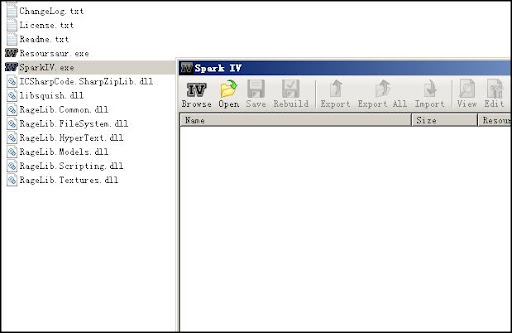
确定上述备份工作完成,Spark下载出来是个rar压缩包(还是个zip文件我忘了),然后随意解压在某个路径下都可以,打开这个文件夹,可以看到是这样的:


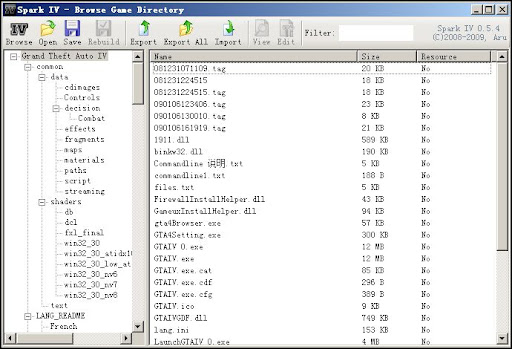
双击SparkIV.exe,会打开一个浏览器:


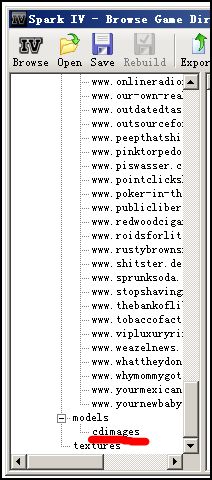
点击Browse按钮,稍等片刻,Spark会自动查找你硬盘上安装的GTA4的路径,几秒钟的时间,它就会自动打开GTA,然后看到这样的树状浏览图:


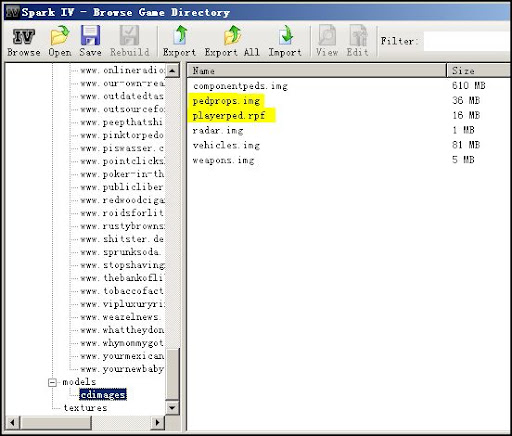
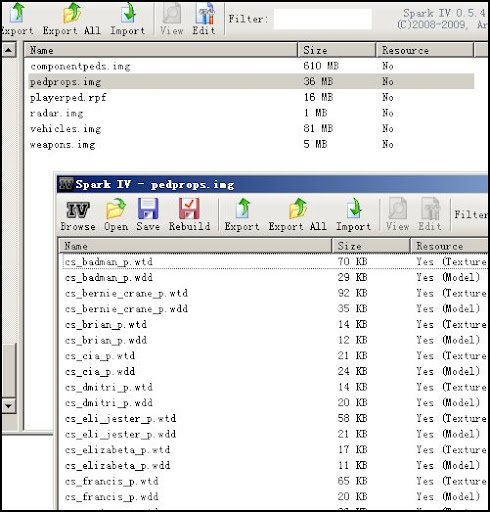
将推子拉到最下,可以看到左侧Models下面有个cdimages文件夹,这就是我们刚才备份过的那个,点击它,右边可以看到如下文件,而黄色部分两个文件就是涉及到头盔和服装的:


pedprops即主角周边的物体素材,比如其他的人物啊,主角的头盔啊帽子啊眼镜啊等等;playerped则是主角专用的服装如夹克啊西装啊牛仔裤多袋裤和皮鞋球鞋啊,还有被官方隐藏的截指手套啊等等.

首先制作头盔,双击pedprops文件,Spark会自动打开一个新的浏览窗口展示pedprops里面的内容:


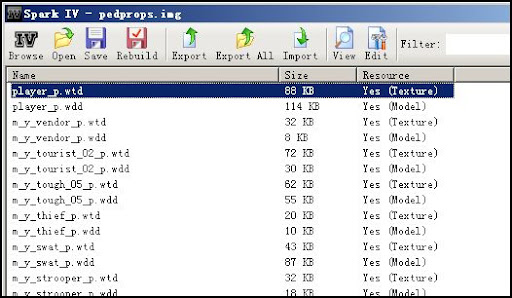
将新窗口的推子拉到最下,或者双击Name按名称排序,可以看到一个名为player_p.wtd的文件,大小为88KB,内容为Texture素材:


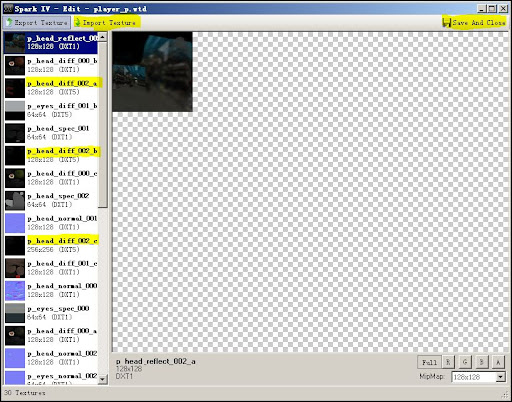
双击这个player_p.wtd文件或者点右上方菜单中的View图标,你将以浏览的方式观察其内容,浏览模式下,你只可以将里面的内容保存出来,而不能替换成新的内容,现在可以养成好的习惯,点击View旁边的Edit:


这个窗口就是以Edit编辑模式进来的窗口,黄色标记的地方为几个重要地方,一个是Import Texture导入素材,一个是Save and Close,另外三个就是主角会随机用到的三个不同颜色的头盔了(我的都是黑色,是因为我已经修改过了,原始的将会是黑色,蓝色和白色).

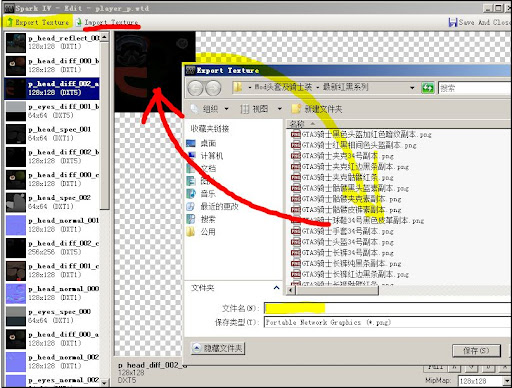
注意,三个头盔主角将会随机使用,所以如果希望自定三种颜色,你就需要修改三套头盔,如果只希望用到一种比如黑色,你可以修改三个以黑色为基调的图案然后分别导入和保存.更容易点,如果你懒得修改,你可以直接导出第一种黑色的素材,使用Export Texture,然后保存在随便那个地方,再选择其他头盔Import Texture,然后Save & Close即可!(红黄线即为导入和导出大概形式)


上述即是主要原理,大家现在就可以试试,将蓝色和白色的讨厌的女人头盔换成纯黑色的,以后Niko不会再显得很肉了!

希望修改现有头盔的花色的话,我们还需要进一步的加工,就拿第一种黑色头盔来说吧.首先Export,保存出来.你将看到一个PNG格式的图片,可能的话,最好用Photoshop来编辑它.

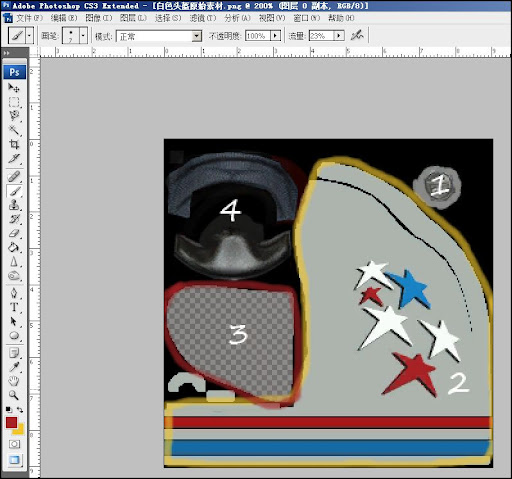
下面是用PS打开的白色头盔,因为PS的蒙版作用,可以在你不损坏原图的前提下添加各种你想要的效果.其中数字1标记的地方,为头盔与防风罩的联接处;黄线框中的2标记的地方,为头盔的主要色调和花式;红线框中的3标记处,为面罩部分,可以看到这里是透明效果,游戏中这里将只显示透明的反光而不显示任何颜色;区域4则为头盔内部装饰物如护嘴啊内枕啊等等,这些在游戏中基本上看不到,完全不重要.


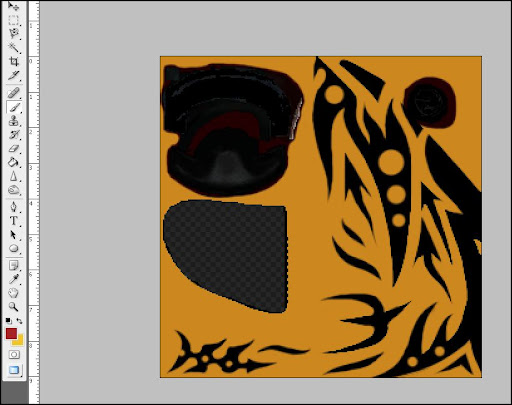
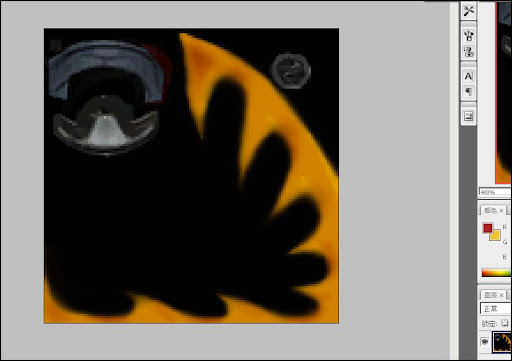
记住这些区域的位置,或者直接复制一个图层大肆的修改,你就可以定制自己的头盔了,千万注意,各个区域不要相互冲突,比如黄色部分头盔主色调和框架基本上就是游戏中头盔的整个包络,而红色部分也刚好是面罩部分,颜色不要叠加,否则会很难看.至于面罩的透明色调,完全可以用纯黑色或其他颜色替代成不透明的,一样很酷.至于PS的过程无聊而繁琐,我只展示一下大致的概念,如下:


完全是我全部手绘的纹路哦!


狼牙的造型!

不过上面两个造型,我最终没有在游戏中采用,太招摇了,完全不低调...我最后还是采用了红与黑的.

记住,这里的素材只是单面的,游戏中会自动复制另一面,这就意味着自制的花式可能会显示得和想象的很不一样,另外,头盔有几个部位是会自动拉伸的比如额头一处,游戏中花式会弯曲变形,因此,你必须不断的尝试,得出最满意的效果,各中步骤,我就不一一赘述了,减轻你实验的痛苦,无异于降低你最后的成就感!

另外,完成颜色花色的修改后,记住依旧保存为PNG格式的图片,再用Spark打开pedprops,找到player_p.wtd,找到你想要更换的头盔,选择Import Texture,导入这个PNG,最后Save&Close,然后逐步关闭Spark,进游戏.我常常出现修改完后,一时兴奋,都没用Spark替换就进了游戏,这个过程啊,折磨...

以下是部分新服装画面:


基本确定的造型!


过于邋遢而被淘汰的造型!


手臂大腿和头盔上的条纹太多而被淘汰的造型!


过于招摇而被淘汰的造型!


最完美的造型!

有空再写个制作衣服的吧!原理完全相同,只不过步骤更繁琐一些...

2009年1月5日星期一

Ghost Rider - Rebirth


离上次登文过了好久了,并不是我不记得写,而是忙着研究一个很有意思的东西,我所惊叹的游戏,GTA4,激发了我的导演梦想,其内置的Video Editor,具备强大的拍摄和制作能力,基本上,一部动作片所需要的拍摄角度,风格滤镜,速度曲线,VE都可以做到,演员也是现成的.玩要玩出范儿,打穿关可不算,有本事跟我一样拍个电影试试?

敬请欣赏09年大作,幽灵骑士之重生,导演PiGGY本人,制片啊特技啊打杂的都是俺!!!


更新一个快点的国内优酷站的


顺便,皇马赢球了,不过顾不上管它.隔天把Angel的照片登上来...

2008年12月1日星期一

GTA 4. 从此以后...


过不几天,GTA IV就要问世了.也许明天,或者后天.

一时手痒,到处找GTA的视频预热,不过这回找到了一个国外玩家用GTA模板制作的小电影,居然看得我感动不已.

片名叫"从此",The Days After,我也不知道这么称呼是否准确.描述的是致命病毒席卷都市后,一个生还者的喃喃自语和思考...


色彩,光线,角度,移动,音乐,台词,造型,一切都非常的舒服,夹杂着死亡后的痛苦和充满着平和的宁静,虽然那么矛盾,但就是这么默契.很感动......

2008年7月15日星期二

完美的满分! GTA IV GS官方评论

PiGGY最喜欢的游戏之一:GTA(侠盗猎车),它和MGS(合金装备)GT(赛车)WE(实况足球)是俺当年买PS2说服自己的主要理由,可惜的是今年出的IV代没办法玩了.("谁叫你花好几万去买什么破相机!!!"旁白音响起)...说的是啊,鱼和熊掌不可都得("兼字不会打么?"),没有PS3的PiGGY只能看着这篇文章心中意淫了......

顺便感谢GameSpot中文站的责编Bird童鞋,虽然俺俩互不认识,但就冲你这篇精彩的译文,你以后的文章俺转定了!

以下请拜读全文:

=GameSpot评分=10

综合评价:华丽的单人任务模式和支持16对战的多人模式将本作打造成了侠盗系列最为成功的作品

●优点:
  1. 扣人心弦的剧情

  2. 生气勃勃的自由城

  3. 全程开放的16人联线

  4. 妙语连珠的幽默对白以及广播媒体节目

  5. 较前作大幅度进化的操控

●缺点:
  1. 友方AI偶然性的卡壳

  2. 画面上的偶尔瑕疵

从偷渡的Niko Bellic脚踏美国土地的那一刻起,RockStar North的强势新作便扑面而来。不错,这确实是另一款让玩家偷车,袭警的GTA,然而,仅以此来评判GTA 4还远远不够。扣人心弦的故事,忍不住喜爱的主角和丰富的多人模式。诚然,GTA 4有它的瑕疵,但是,本作无疑是系列的巅峰。

完美的满分!《侠盗车手4》GS官方评论

更逼真,更富有生气的自由城不仅使本作彻底超过了它的前辈,也营造了在游戏世界里前所未有的震撼。由于剧情背景的设定,本作和GTA3同样发生在自由城,街景上自然有相似之处。自由城的居民们令人信服地过着自己忙碌而平静的生活,对几大帮派的火拼全然不知。然而,主角Niko却没有这份幸运。被堂兄Roman一路骗到了美国,这不争气的堂兄嗜赌成性,Niko被迫为其中一个帮派“打工”。Niko的从军经历使他很快成为了一个称职的雇佣兵,虽然他毫不掩饰对杀戮的厌恶,他还是一如既往地完成别人塞给的一切,希冀着有一天能够实现自己的报复。

完美的满分!《侠盗车手4》GS官方评论

实际上,Niko并不需要照单全收。在流程中,玩家并不知是盲目地执行任务,而是有选择的权利。当目标人物答应从城市消失后,你完全可以放了他或者她。风险则是雇主在以后的任务中发现这个人还活着,以及你的不忠。这些你放生的人甚至还会给你任务。再细说下去就剧透了,只能告诉大家,你的给个决定都会对整个剧情产生影响,你很可能会最少玩上两遍来看不同的结局。

完美的满分!《侠盗车手4》GS官方评论

主线剧情要大约30小时的游戏时间,而支线任务和可选择的活动更是无穷无尽。和前作一样,主线任务的基本模式无外乎把人送到城市的另一处,或者把人直接送到地狱。模式相似,但是难度大大降低,一方面得益主角受过的军事训练,一方面也归功于LCPD(游戏中的警察)的不务正业。主线任务中不乏创意十足的桥段,包括绑架,银行劫案和一份工作面试。过场动画被精心演绎,也是游戏角色展露演技的时刻。所有的角色都配合了流畅的动画,完美的配音和令人难忘的面部表情。虽然,在和他们一起完成任务的过程中会出现跟不上主角,或者卡在门口一类的小Bug。然而,这些问题少之又少,新加的重新开始任务选项也减轻了玩家的痛苦。

完美的满分!《侠盗车手4》GS官方评论

完美的满分!《侠盗车手4》GS官方评论

主角能够翻越栅栏和墙壁,最为重要的是可以找到掩体。只要一个按键,主角就可以靠在墙上,停着的车辆上。掩体系统使GTA的射击有了质的飞跃,改进后的锁定系统也让射击更加方便。

一旦你进入掩护状态,敌人也不会绕过来,而主角则可以在敌人躲在掩体后的情况下照常锁定,因此,只等他们探头出来,一枪毙命即可。自动瞄准会默认对准胸部,之后可以通过右摇杆来微调准星。虽然不用锁定系统会对战斗要求提高,但是当你在掩体后被强火力压制,无法抬头的时候,盲射的瞄准就十分必要了。

完美的满分!《侠盗车手4》GS官方评论

鉴于玩家在完成任务过程中造成的人身财产伤害,警方的出现自然在所难免。即使剧情的剧本里并没有警方卷入这段情节。自由城的制服蓝精灵们反应迅速,效率却远不敌前作中的同事。他们既不会疯狂地追赶,也懒得设下路障,而且FIB(绝非错打,而是游戏中的称呼)大牌到玩家炸了一条街,才有御驾亲征。

完美的满分!《侠盗车手4》GS官方评论

这还不算,GPS系统给了玩家极大的不平衡优势。除了指路,还可以用作警察探测器。一旦犯法,GPS上会显示出玩家所在区域内所有的警车和警察,并且标出警方的搜索圈(以嫌疑人最后的目击地点为圆心)。你只要逃出这个圈子,息事宁人地等上十几秒,就万事大吉了。理论上该系统无可厚非,但想来,逃跑也太过简单了。

完美的满分!《侠盗车手4》GS官方评论

不工作,不飙车,又不惹事的时候,自由城里还是有事做。某些事件的奖励会对以后的任务大有裨益,另一些则挥洒着GTA特有的幽默。比如,看电视,视听风趣的广播节目,看滑稽演出(某些相当著名),甚至上网。

只有在闲暇之余,玩家才会注意到GTA4里的英特网。某些网站只有在E-mail的链接才能进入,某些则长期打着广告。TW@网吧是个上网的好去处,网上也充斥着搞笑的内容。不过,最爱逛的要数一个网上交友的网站。根据玩家的资料,会有约会找上门哦。约会和交友是GTA中最耗时间,也最不耗时间的活动,这要看玩家了。虽然有些人对交往的场所要求苛刻,但是哄人开心对你好处多多。具体方法就是投其所好。不同的人自然嗜好不同,某些喜欢和主角打保龄球,桌球或者飞镖,某些则更喜欢一起吃饭,一起大醉。

完美的满分!《侠盗车手4》GS官方评论

约会就要讲究一些了,是否按时赴约,约会的地点,甚至是否鼓起勇气带她回家都直接影响女友对主角的看法。约会的成败更取决于你开的车,开车的习惯甚至是主角的着装。女友甚至会留意到你两次的着装相同这种细节。

多个朋友多条路,人际关系对主角大有帮助。这里不多剧透,给些提示:有个律师朋友能帮你对付警察,而朋友簿上有个护士则意味着多了条命。

完美的满分!《侠盗车手4》GS官方评论

和女友,朋友以及敌人保持联络的重要途径就是:手机。很难想象如此简单的东西对一款游戏有莫大的影响,以至于寸不离身。现实生活中用过手机的玩家都会操作这个,用十字键和另一按键便轻松搞定所有功能。给熟人打电话,或者开车接手机都很简单。这里不需要选择对话的句子,只要选择给谁打,聊什么就够了。一旦对方接了电话,对话便开始了。接电话更容易,虽然来电的时机很可能不对:比如你正在车上和小姐亲热的时候,女友打电话过来。令人惊叹的是,竟然可以从游戏中的英特网下载手机的彩铃和主题。

为了展示小组的细心和周到,这里以偷车为例。虽然只是一个按键的事情,偷一部停在那里的车也会导致不同的结果。通常情况下,车门锁着,Niko会用肘或者脚砸碎玻璃。进如驾驶室后,会划火启动;可以按L键加速这一过程。如果车上装有防盗系统,警笛会响,前灯会闪烁几下,临近如果有警察,则会跟上你。车里有驾驶员和乘客的话,情况就更加复杂了,很有可能的结果是胳膊夹在车门里被拖出很远。

完美的满分!《侠盗车手4》GS官方评论

和系列之前的作品一样,GTA4的许多车辆操控性极好,很容易做出甩尾。玩家当然可以通关时不违反任何交规,但是,不被警察逮住,或者压死太多行人的情况下,往死里开也没人管。驾驶的视角也十分体贴。

完美的满分!《侠盗车手4》GS官方评论

但是,从GTA3就开始出现的一件怪事在这里重演;细心的玩家会发现,一旦开着某种车辆,道路上会出现大量同型号车。这对游戏没有任何影响,只是心里上有些不适,比如,你开着一辆限定般的法拉利,突然发现满街都是法拉利。但是,真正忙不起来的时候,哪还顾得上这个。

GTA4的联线功能实在太简单了。只要在手机上选择多人模式选项,以及希望加入的模式,就能进入房间等待开始。这等待绝不乏味,因为你进入之后,实际上是来到了在线的自由城,和其他15个玩家为所欲为。四处散落的武器也屏蔽的无聊的可能性。

有十余款多人模式可供选择,虽然某些大同小异,但是玩法的多样性毋庸置疑。作为建立游戏的楼主,可以设置是否有同组伤害,警察,武器的种类,交通拥挤的程度,雷达功能等等。同样可以选择区域,因为某些模式限制在特定的城区,而某些则是全程开放。

多人模式特色十足,即使是传统的死亡竞赛和竞速也相当的迥异。有比赛完成任务的模式;有两组人分别扮演警匪的模式;有帮派争夺地盘的模式;以及合作完成任务模式。选对了队友,就不愁没得玩。不过,还是要有拖慢,丢帧的心里准备。

完美的满分!《侠盗车手4》GS官方评论

X360版和PS3版差异实在不大。PS3版本初玩的时候要有10分钟的安装时间,相应的load时间会减少,读盘的频率也少些。画面则是平手。GTA赖以生存的音乐表现力则根据外接设备的不同而不同。GTA4的原声带实实在在地笼络了一批授权的好歌,而唱片信息也绝不会烦人地弹出来影响游戏。然而,当你确实想知道歌名的时候,只要想游戏里的手机中提出申请,就会收到唱片信息的回信——天才的创意!

完美的满分!《侠盗车手4》GS官方评论

话说到这个份上,你也该开窍了:你没有任何理由不玩GTA 4。完成全部任务后依然久久徘徊的自由城是系列的顶点,多人模式在以后的几个月里都不愁找不到人玩。前作的诟病被一一根除,小小的瑕疵也被游戏彻底的优点所掩盖。自由城里该干的事情太多了,你怎么还有时间看评论?去买一张,玩啊!

责任编辑:Bird